

Understand and lift your quality score
What the quality score measures, how to read it, and how to raise it with one click or by sharpening your brand.
What the score measures
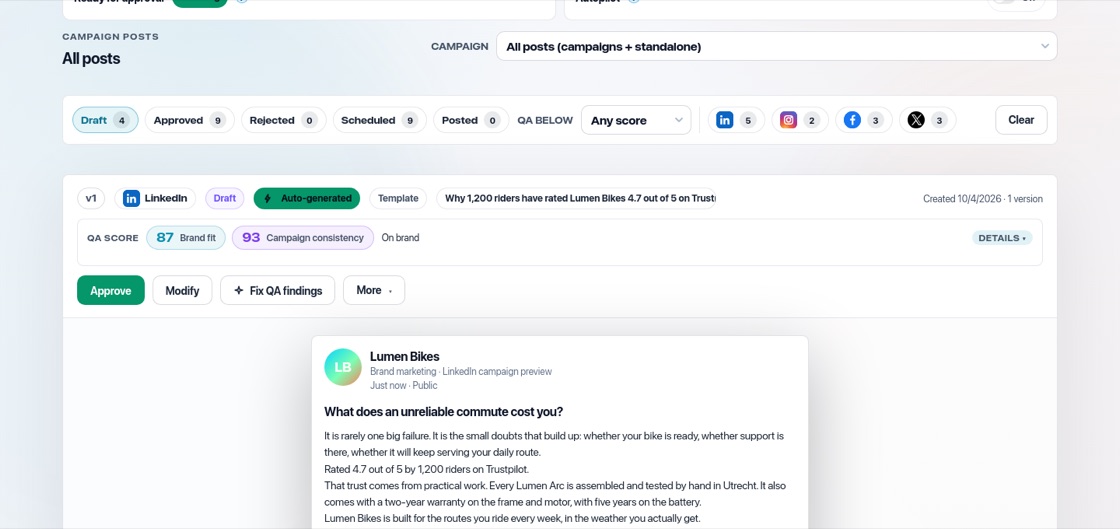
Every post and document gets a quality score out of 100. "Brand fit" shows how well it matches your voice, strategy and proof. Posts in a campaign also get "Campaign consistency". The score keeps weak content away from your audience.
Read it
Next to the number you see a verdict: "Elite fit", "On brand", "Needs polish", "Needs work" or "Review closely". Open "details" to see why, for example a tone that does not match, a claim without proof, or a weak call to action. An arrow shows whether a new version scores better than the previous one.
Fix it in one click
Press "Fix QA findings" on a post or document. BrandOps9 rewrites it to solve the findings while keeping your message and your real proof, then scores it again. The new version follows the same rules as the original: the inspiration it was built from (including the words on its image and the layout), the featured product with its photos and facts, your confirmed Brand facts and the post format, such as image-only.
Raise scores everywhere
If scores are low across the board, improve the inputs rather than each post: sharpen your tone of voice, add concrete proof points, and make your audience and offer specific in your strategy.