Notifications and emails
Choose which emails BrandOps9 sends you for a brand, when, and who gets a copy.
Where to set them
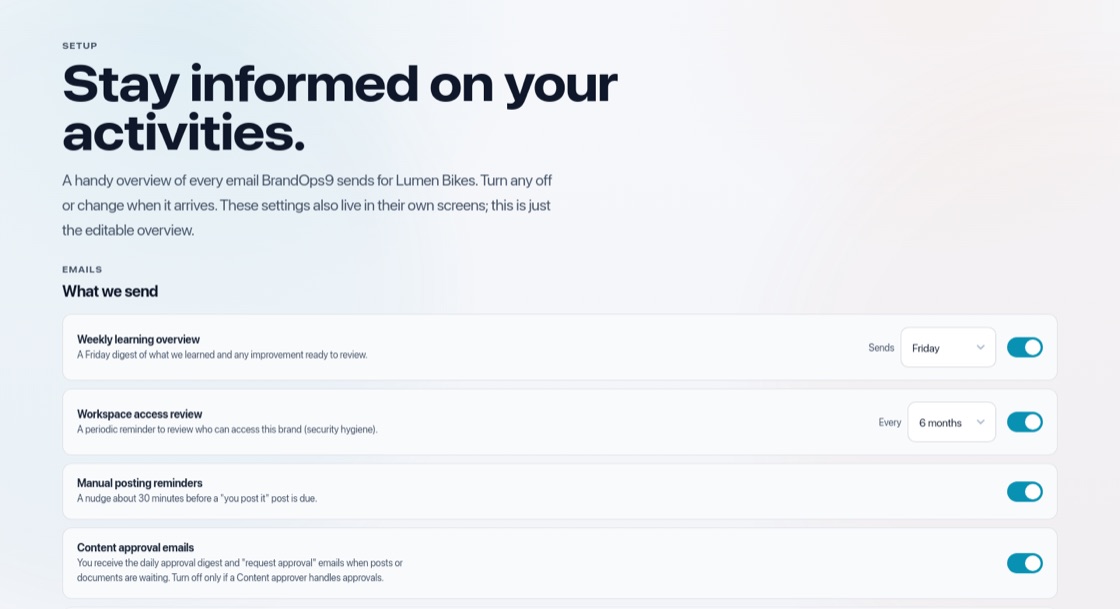
Open Setup & Support → Notifications. The settings are per brand.
The emails
- Weekly learning overview: what worked last week and what to improve. Choose the day (Friday by default).
- Workspace access review: a reminder to check who has access, every few months (six by default).
- Manual posting reminders: the ready-to-post content about 30 minutes before a post you publish yourself.
- Content approval emails: the daily digest of what is waiting for approval.
- Low-content alert: when a platform is running low on scheduled posts.
Send a copy
Add an address under "Also send a copy to" to keep a colleague in the loop.