

Your media library and brand kit
Upload and reuse images, tag them, put your logo and a caption on them, and choose which images others see.
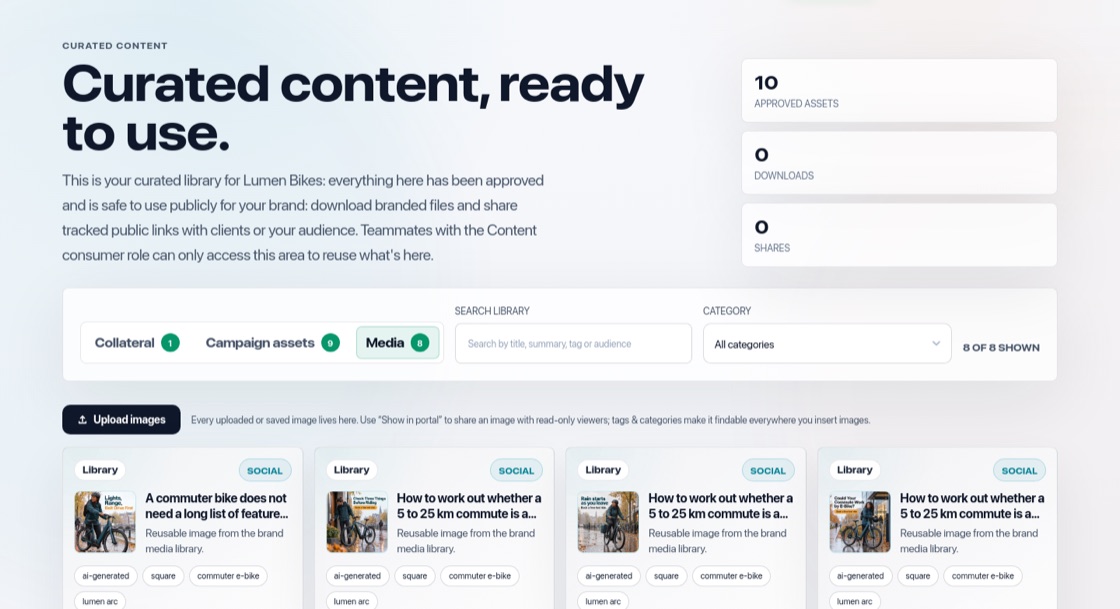
Where it is
Your images are in Curated content → Media. The library holds images you upload and images from content you approved, not every draft, so it stays tidy. In any editor, "Library" lets you pick from it.
Add and reuse images
- Press "Upload images" (PNG, JPG, WEBP or GIF).
- Approving a post or document adds its image automatically.
- Reusing an image never makes a copy, so each picture appears once.
Tag and share
Use "Edit meta data" to add a category, tags and a description so you can find images quickly. "Show in portal" decides whether an image is visible to Content consumers.
Apply your brand kit
Press "Apply brand kit" to put your logo in a corner and add a caption as a bar or a pill, at the top or bottom, in your brand colours. You see it straight away. "Revert branding" brings back the original image. The same button is on posts on the Approve page.