The dashboard: what needs your attention
Your brand's home screen: what is waiting for you, your growth path, the coverage outlook, and a shortcut to every area.
One screen that tells you where you stand
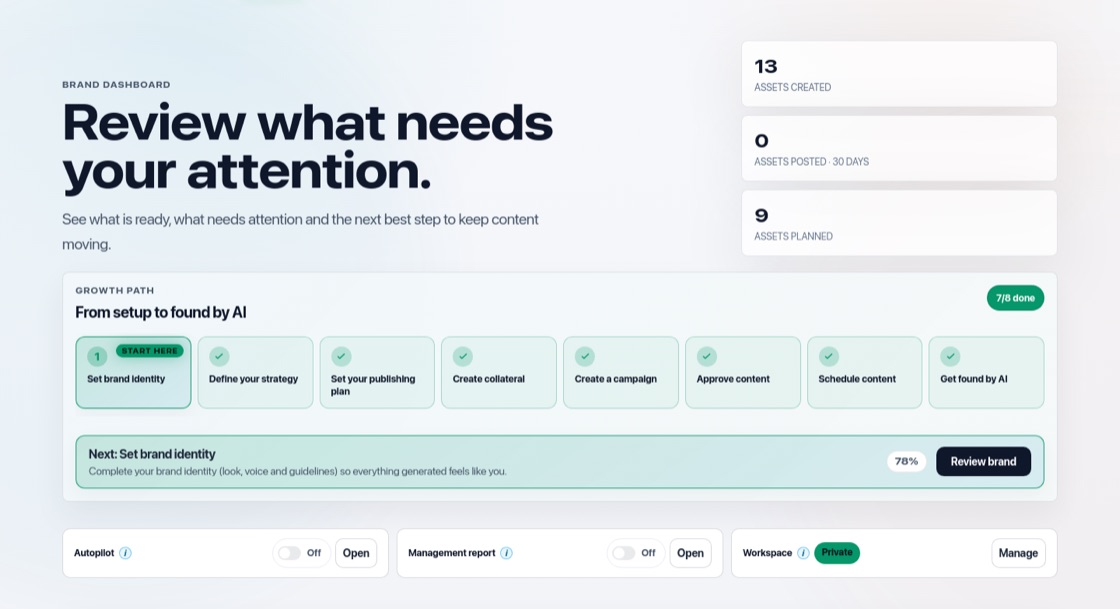
The Dashboard is the first thing you see for a brand. At the top you see how many assets were created, posted in the last 30 days and planned. Each number opens the screen behind it. Below that, three quick switches: Autopilot on or off, the Management report on or off, and who has access to the workspace.
Needs your attention
This section lists what is waiting for you: posts and documents to approve, posts to schedule, content where changes were requested, and new improvement suggestions from Learning. When there is nothing to do it says "You're all caught up".
Your growth path
The eight setup steps, with the next one highlighted. Once all steps are done, it disappears from the Dashboard after your next visit, and it comes back if a step opens again. See "Your growth path: the 8 setup steps".
Coverage outlook
For each platform you see whether the coming days are filled (14 days, or as far as Autopilot fills ahead when it writes your posts): "Covered", "Needs N more", "No content", or "Not configured" when the platform is not in your publishing plan. Thin coverage shows up early, so you can create or approve more before the calendar runs empty. "Open Publish" takes you to the calendar.
Shortcuts to everything else
Cards for collateral, campaigns, approvals, learning and Get found by AI each show their status and link straight to that area. While your brand or strategy is still incomplete, readiness cards show what is missing. Every six months a security review reminder asks you to check who still has access.