

Autopilot: hands-off publishing
Let BrandOps9 write, approve and schedule posts for you: the three switches, the quality bar, and why Autopilot sometimes pauses.
Switch it on
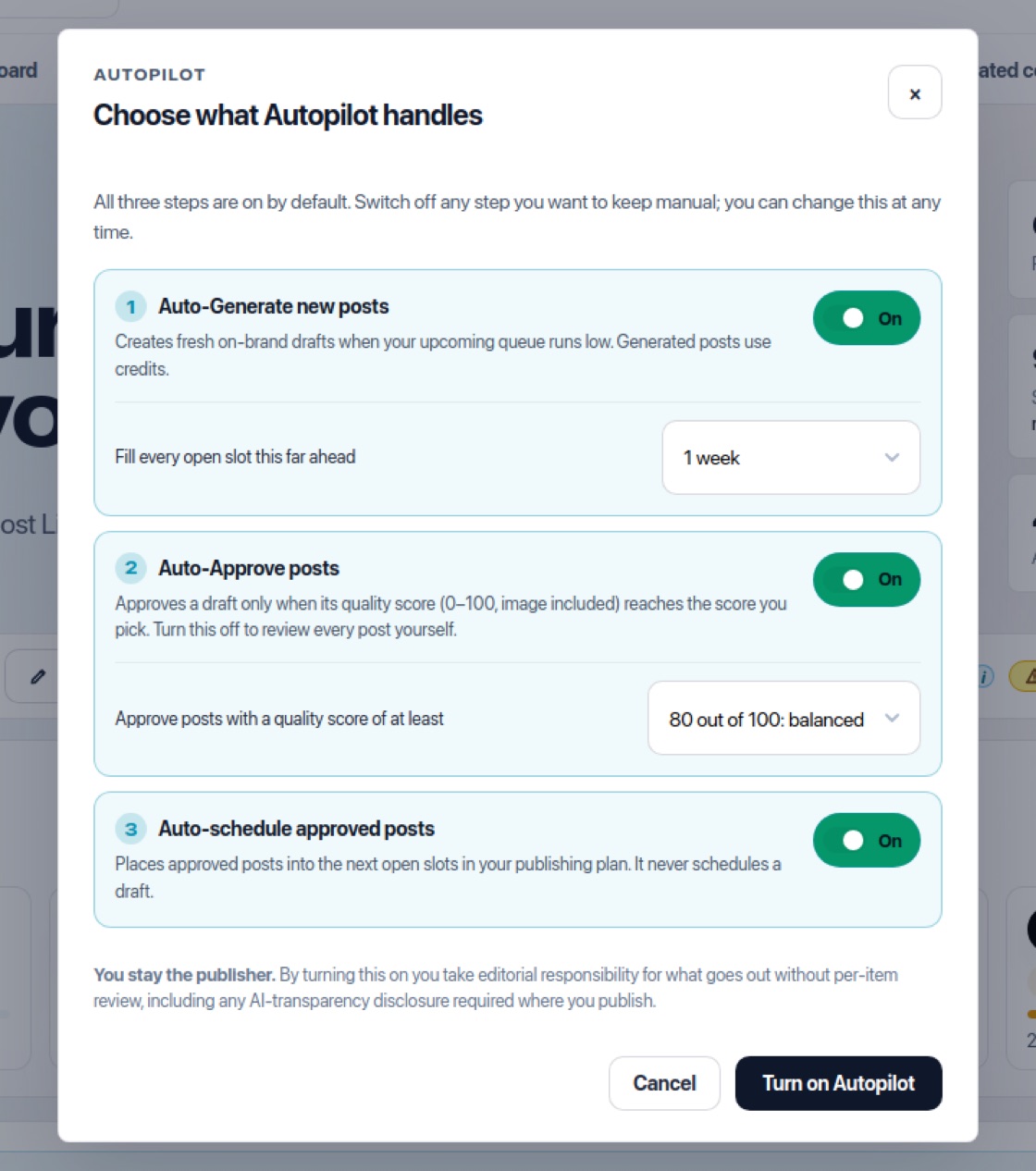
Turn on Autopilot on the Publish page, the Approve page or the Dashboard. A window asks you to "Choose what Autopilot handles" and to confirm that you stay the publisher, then press "Turn on Autopilot". A notice at the bottom right of the screen confirms it. Change the settings later with "Configure".
Three switches
- Auto-Generate new posts: it writes a fresh post from your brand and strategy for every open slot in your plan, for each platform on its own, and every post is planned and published on its own platform. You choose how far ahead it fills: 3 days, 1 week, 2 weeks or 3 weeks. Generated posts use credits.
- Auto-Approve posts: it approves posts that score at least 90 (strict), 80 (balanced) or 70 (lenient). Brand fit, image fit and campaign consistency must all reach the bar.
- Auto-Schedule approved posts: it puts approved posts into your open slots. It never schedules a draft.
See what Autopilot did
The Autopilot card shows how many open slots are left in that window, for example "3 open slots to fill in the next week" or "Every slot filled for the next week". Queue coverage shows the same window per platform. Autopilot writes up to 3 posts every half hour, so a new or empty plan fills up over a few passes. Posts it wrote or approved carry an "Auto-generated" or "Auto-approved" label, and Plan & credits shows what Autopilot spent.
One campaign per topic
Autopilot picks a topic and writes one post for each platform in your publishing plan on it, all in one campaign named after the topic. Platforms post at different rates, so a topic stays open for two weeks and later posts for the other platforms join it. In Campaigns these show the label Autopilot; use Made by to see only yours or only Autopilot's. Campaigns Autopilot made before October 2026 stay as one campaign per month.
Varied posts
Autopilot varies its posts per platform so a stream of posts doesn't read alike. It rotates nine writing angles (such as a how-to, a myth-buster, a question or a customer scenario), asks for the conversion in about one post in three, and mixes formats:
- Text and image: about half of the posts.
- Image-only: about one in seven, when Words on images is on. The image carries the message and the text is one short line.
- LinkedIn poll: at most one a week, on LinkedIn only. A poll has no image, so Autopilot never approves it: it waits in Approve for you. Edit the question and options under Modify. To make a poll yourself, use "Ask your audience" in Campaigns → New campaign.
- Template post (Inspired by): about three in ten. All style templates from Start from inspiration take turns, so none comes back within six posts. Filled only with your Brand facts. A product post can use a template too, with the real product photo.
- Words on the picture: the headline takes turns between layouts (at the top, in a colour band at the bottom, large like a magazine cover, in a split panel, or small in a corner), and about one picture in five has no words at all.
- Pictures: each topic gets its own kind of picture, such as people, a detail close-up, a place, behind the scenes or the product in use, and its own light. The platforms of one topic share it, and Autopilot avoids the pictures it made recently. Your palette and visual rules always come first.
When posts score below your bar
A yellow QA tag next to Autopilot on Publish means some Autopilot posts scored below your bar and wait in Approve. Hover over it to see why, for example "Carousel slides are missing their words" or "The product changes from slide to slide". Click it to open Configure with each reason and what to do; each reason links to its drafts with "Open the draft" (or "Open draft 1", "Open draft 2" when there are several). An Autopilot campaign whose posts missed the bar shows the same reasons at the top of the campaign. When a post misses the bar only because of its text, Autopilot fixes the text once by itself, keeps the same image and checks it again; only a post that still misses counts as a miss.
Why Autopilot paused
If Auto-Generate and Auto-Approve are both on and new posts keep scoring below your bar, Autopilot switches itself off after five misses in a row and emails you. The Publish page then shows a card "Autopilot paused itself" with the main reasons, and "Add your products" when product photos would help. Press "Resume Autopilot" to start again: the five misses start counting from zero, so old misses do not pause it straight away. You can also sharpen your brand and strategy so posts score higher, or lower the bar. It also pauses and emails you when you run out of credits.