

Approve, reject and request changes
The Approve page: review posts and documents with their scores, approve or reject, ask for changes, and notify approvers.
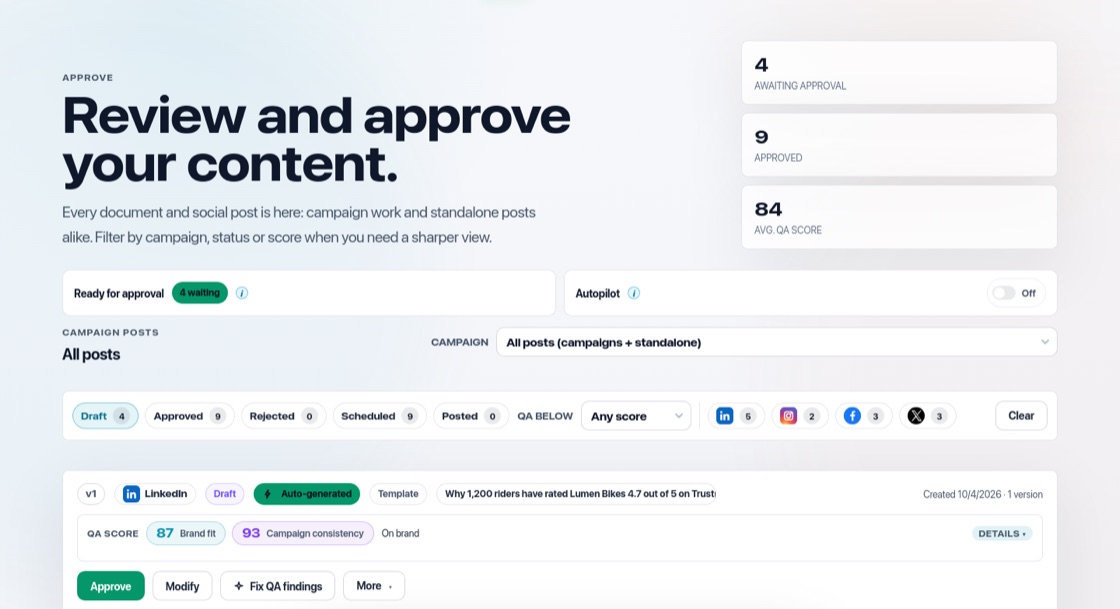
Everything waiting in one place
Open Approve in the top menu. At the top you see how many items are awaiting approval, how many are approved and the average quality score. Documents awaiting approval are listed first, then posts. Filter by campaign or by score.
Approve, modify or reject
- Approve: the post is ready to be scheduled, or the document can go live.
- Modify: edit the post first. Saving creates a new version.
- Fix QA findings: let BrandOps9 improve the post for you.
- More → Reject: set it aside for good. More → Request changes: leave a note on what to change.
Get someone else's approval
Invite a colleague or client to your team as a Content approver. Press "Notify approvers" to email everyone who can approve right away. They also get a daily email when items are waiting. The links in the email open the item in BrandOps9 after they sign in.
Let Autopilot approve
If you switch on Auto-Approve, posts that score at or above the bar you set are approved for you. See "Autopilot: hands-off publishing".